
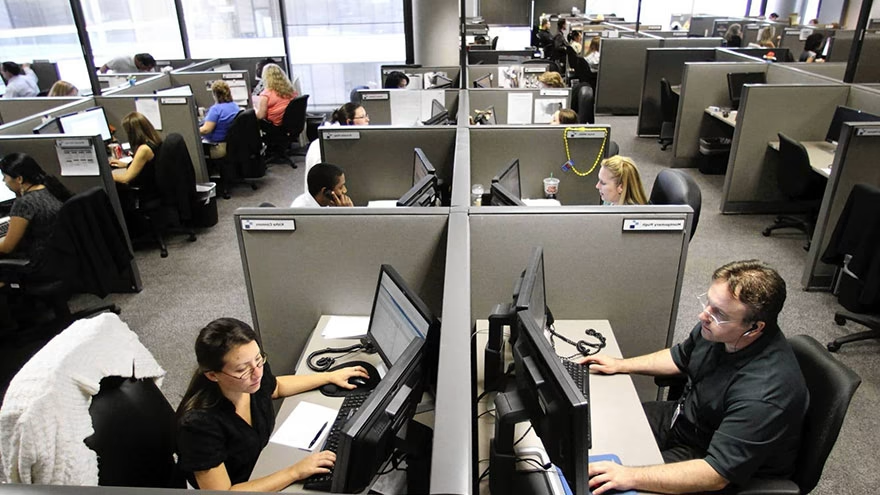
Start with the rules you cannot change
Before buying organizers or printing photos, check workplace rules on wall coverings, lights, heaters, plants, scents, food, religious items, political material, and personal appliances. A cubicle is partly yours, but it still sits inside an employer's space.
If you already have a broader desk project, compare it with personalizing an office cubicle. The best version is the one that can survive a manager walk-through and a normal workday.
Set the workstation before the decorations
Comfort starts with monitor height, keyboard position, chair support, wrist angle, and reach. OSHA's computer workstation eTool gives practical guidance for arranging a computer workstation before style choices take over.
Put the screen where your neck stays neutral, keep frequently used items close, and leave room for your mouse. Decoration should not force the body into a worse position for eight hours.
Choose personal items with a small footprint
A few photos, a mug, a small plant, a calendar, or a piece of art can make the space feel less temporary. The trick is choosing items that do not steal work surface, block airflow, or make the cubicle hard to clean.
Rotating one or two seasonal items works better than filling every panel. A cubicle with some blank space often feels calmer than one where every inch asks for attention.
Respect scent, sound, and sightlines
Candles, diffusers, loud desk toys, flashing lights, and strong snacks can turn a personal choice into a shared problem. In a cubicle area, the neighbor experiences part of your setup whether they agreed to it or not.
Office courtesy shows up in small details, the same way it does with sensitive office etiquette. If an item may distract, smell, or make someone explain themselves, leave it out.
Use vertical space without making a wall
Cubicle panels are useful for a calendar, reference sheet, file pocket, or small board. Keep the top edge clear if your office values visibility. Do not create a private fort unless the workplace already allows taller panels or screens.
A clean vertical system can reduce desk clutter. Put urgent notes at eye level, archive papers in folders, and remove expired reminders before they become wallpaper.
Build a focus zone
The best customization makes work easier. Add a task tray, cable clips, a quiet timer, a water bottle spot, and a notebook that catches loose thoughts. These small decisions reduce the friction of starting and restarting work.
If fatigue is part of the problem, pair the setup with habits from staying awake at work. Light, hydration, movement, and cleaner desk cues often help more than another decoration.
Keep private life private enough
Photos and keepsakes can be warm, but the cubicle is not a diary. Avoid displaying private documents, medical reminders, financial paperwork, children's schedules, or anything that invites questions you do not want to answer.
NIOSH's ergonomics overview at cdc.gov is a useful reminder that workplace design affects how people feel and function. Privacy and comfort are part of that experience too.
Make the space easy to reset
A customized cubicle should be simple to clean on Friday and simple to pack if a team move happens. Use removable hooks, lightweight frames, labeled folders, and a small box for personal items.
If your role includes front-desk or shared administrative work, the same discipline used in administrative office duties applies: the space should support work before it expresses personality.
Make the plan fit real life
The useful version of this topic is the one that fits the reader's actual situation. The setup should fit office rules, shared-air realities, ergonomic needs, and the kind of work done in the cubicle. A plan that only works on paper will not survive a normal week, a tired afternoon, or a small mistake.
Start with the constraint that is least flexible. That may be time, money, safety, access, health, policy, family expectations, or local rules. Once that limit is clear, the rest of the choices become easier to sort.
Watch for the mistake that changes the outcome
The common mistake is decorating first and discovering later that the workspace is uncomfortable, distracting, or against policy. It usually happens because people want the answer to be simpler than it is. Slow down long enough to separate facts from hopes.
Good judgment is often quiet. It looks like reading the policy, checking the weather, asking one more question, saving a record, or choosing the smaller step before the larger one.
Use a short checklist before you commit
Before acting, check the basics: policy, chair, monitor, keyboard, cable control, scent, sound, sightlines, private paperwork, clean reset plan Keep the list short enough that you will actually use it. A long checklist that nobody opens is just decoration.
If another person is involved, confirm the same points in plain language. Most bad decisions in everyday life are not caused by missing expert knowledge; they are caused by assumptions nobody tested.
Know when to pause
Pause when an item needs electricity, produces scent or noise, blocks visibility, or could make a coworker uncomfortable. A pause is not failure. It is a way to keep a small uncertainty from becoming a costly problem.
If the situation involves health, legal rights, safety, money, or another person's trust, get qualified help instead of forcing a quick answer. The right next step may be slower, and that is often the point.
Turn the advice into one next step
Do not try to solve the whole subject at once. Pick the first item that can change the decision today, then check it against the practical list: policy, chair, monitor, keyboard, cable control, scent, sound, sightlines, private paperwork, clean reset plan That keeps the work grounded instead of letting the topic become a vague intention.
A small verified step is better than a confident guess. In practice, that may mean reading the rule, checking the map, saving the message, measuring the space, asking the clinic, reviewing the profile, or confirming the payment terms before anything else moves.
Keep notes while details are fresh
Good notes do not need to be formal. Write down the date, source, name, rule, price, condition, or answer while it is still fresh. That record gives you something calmer to use later if memory, stress, or another person's version of events starts to blur the issue.
For this topic, notes should focus on the decision point rather than every side thought. Record the fact that would change your choice, then leave room for updates if a source, policy, weather report, profile detail, or schedule changes.
Match the advice to the stakes
Low-stakes choices can move with common sense and a short check. Higher-stakes choices need more patience, especially when safety, health, pay, travel money, family trust, or another person's comfort is involved. The amount of checking should rise with the possible cost of being wrong.
This is where the earlier pause point matters: an item needs electricity, produces scent or noise, blocks visibility, or could make a coworker uncomfortable. If that line is close, slow the plan down. Speed is useful only when the basic facts are solid.
Think about the second effect
Many everyday decisions have a second effect that shows up later. A message changes trust, a campsite affects access, a workplace rule changes morale, a food choice affects leftovers, and a travel booking can affect the whole budget. Look past the first convenient answer.
The second effect is usually where regret hides. Before you finish, ask who else is affected, what becomes harder tomorrow, and what proof you would want if the decision had to be explained later.
Close the loop cleanly
Once the choice is made, finish the small administrative work around it. Save the link, send the note, pack the item, label the container, confirm the route, update the file, or tell the other person what happens next.
A clean close keeps the subject from staying half-open in your head. It also makes the advice easier to repeat the next time, because you are not rebuilding the whole decision from memory. A short final note can also reveal a weak plan before it creates extra work for someone else later. That is often the difference between knowing what to do and actually doing it.
Frequently Asked Questions
Can I use lights in a cubicle?
Only if workplace policy allows them and the lights do not distract others. Battery lights may still violate rules in some offices.
Check before adding anything electrical or highly visible.
What is the safest way to hang decor?
Use removable hooks, clips, or approved panel accessories. Avoid nails, tape that damages fabric, and heavy frames.
If facilities has a rule, follow that rule first.
How many personal items are too many?
If you lose work surface, block airflow, or make cleaning hard, it is too many. A few meaningful pieces usually work better.
Leave some open space so the cubicle can function.
Should I decorate for holidays?
Keep it modest and workplace-appropriate. Avoid items that pressure others to participate or create mess, scent, noise, or safety issues.
A small seasonal item is easier to manage than a full display.

Olivia Prete
Edits culture and personal-development articles, distinguishing opinion and experience from verifiable claims.



Leave a reply
Replying to